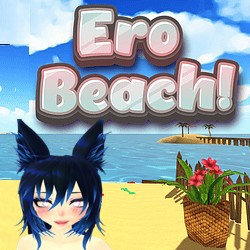
Ero Beach APK is a customizable 3D character experience app that allows users to create and adjust their characters in a beach environment. The app focuses on character customization, scene control, expressions, accessories, animations, and camera movement options.
Users can move, scale, and rotate their characters inside the scene. The app also allows users to save, load, and share character settings. With multiple customization controls, users can adjust different parts of their character and create personalized setups.
Ero Beach APK includes various character controls, animation options, physics effects, and camera features to provide a flexible customization experience.
Gameplay and App Usage
Ero Beach APK is mainly used for creating and customizing 3D characters. Instead of traditional missions or levels, the app provides different tools that allow users to adjust characters and scenes according to their preferences.
Users can customize character appearance, change expressions, apply accessories, select poses, and control the camera view. The app includes an orbital camera system with standard WASD controls, allowing users to view characters from different angles.
The main usage areas include:
- Creating and editing custom characters
- Adjusting character position, size, and rotation
- Changing facial expressions and body settings
- Applying available accessories
- Exploring poses and animations
- Saving and sharing character configurations
Features of Ero Beach APK
Advanced Character Customization
The app provides multiple customization controls for different character parts. Users can adjust various appearance settings to create personalized characters.
Available customization options include:
- 24 controls for eyes and expressions
- 12 controls for smile and mouth customization
- 10 controls for lower body customization
- 9 controls for breast customization
- 4 controls for opening and closing specific character features
Character Movement Controls
Ero Beach APK allows users to move, scale, and rotate their characters within the scene. These controls help users place their characters according to their preferred setup.
Accessories Support
The app includes different accessories that can be added to characters. These accessories provide additional customization options and allow users to change the character style.
Realistic Physics Effects
The app includes realistic hair, body, and physics-based movement effects. These features improve the visual appearance of character animations.
Expression Customization
Users can customize character expressions using multiple controls. The app also includes anime-style expressions that can be selected and mixed for different looks.
Animation Options
Ero Beach APK provides animated poses and character animations. Users can explore different animation options and adjust their characters accordingly.
Camera Controls
The app includes a full orbital camera system with WASD controls. Users can rotate the camera, change viewing angles, and explore scenes from different perspectives.
Save, Load, and Share Settings
Users can save their customized character settings and load them whenever needed. The app also supports sharing character settings with others.
Tips and Tricks for New Users
Learn Basic Controls First
New users should first understand movement, camera, and customization controls. Learning the basic functions makes it easier to use advanced options.
Save Character Settings Regularly
After creating a character setup, saving the settings helps users keep their work and reload it later when needed.
Try Different Camera Angles
Using different camera positions can help users view characters better and adjust scenes more accurately.
Explore Customization Options Slowly
Since the app provides many controls, changing settings one by one makes it easier to understand their effects.
Check Device Compatibility
If pink models appear while using the app, it may be because the device CPU or GPU does not support modern shader technology. Updating hardware or using a compatible device may help improve graphics performance.
FAQs
What is Ero Beach APK?
Ero Beach APK is a 3D character customization app that allows users to adjust character appearance, expressions, accessories, animations, and scene settings.
Can users customize characters?
Yes, users can customize different character parts using multiple controls and adjustment options.
Can character settings be saved?
Yes, the app allows users to save, load, and share character settings.
Does the app have camera controls?
Yes, Ero Beach APK includes an orbital camera system with WASD controls for viewing scenes from different angles.
Why do pink models appear in the app?
Pink models can appear when the device hardware does not support the required modern shader technology.
Are accessories available in the app?
Yes, the app includes different accessories that can be added to characters.
Does the app include animations?
Yes, Ero Beach APK includes animated poses and character animations.
Conclusion
Ero Beach APK is a customizable 3D character application that provides various tools for adjusting characters, expressions, accessories, animations, and camera views. With detailed customization controls, save and share options, physics effects, and animation features, the app allows users to create and manage personalized character setups.
The app is focused on customization and interactive character control, giving users multiple options to modify their characters and explore different scene settings.