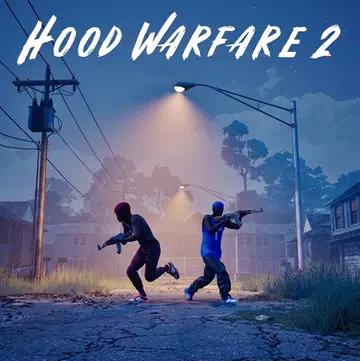
Rival gangs fight for dominance on the streets of Chicago. Choose your gang, customize your weapons, and compete against other players in a variety of exciting multiplayer modes. Fight for territory, challenge rival teams, and claim supremacy in this quirky first-person shooter.
Hood Warfare 2 returns with the same frenetic combat and humor that made its predecessor so popular. This time, it runs on Unreal Engine 5, with enhanced graphics, revamped weapon animations, and several new maps. Fight in the city center, the suburbs, the trenches, and the Chicago Mall. Each location offers different routes, hiding spots, and combat options, whether you're fighting outdoors or indoors.
Weapon customization offers even more options. Install various sights, magazines, grips, silencers, and other attachments to create your own unique weapon. You can also customize your loadout with various perks and gear before starting a match.
Hood Warfare 2 offers six different game modes:
- Turf War: Fight against rival gangs to conquer and control different territories. Your team earns points by capturing areas of the map and eliminating opponents.
- Gangbang: Join a classic team-based shootout. Two gangs face off, and the one with the most kills wins.
- Wreck-It: Fight alone in a free-for-all where everyone is an enemy. Forget alliances and try to finish the match with the most kills.
- Loot: Steal the enemy team's bag and take it safely back to your territory. Protect your team's bag while your gang tries to capture the enemy's.
- Blockade Defusal: One gang must plant a bomb while the other team tries to stop or defuse it. Players only have one life per round, so every decision counts.
- Chain Grab: Eliminate opponents and score points by collecting their chains. You can retrieve your teammates' chains before the enemy gang takes them.
Boost your ranking in the match, gain experience, and unlock more weapons and gear by increasing your reputation. Complete weapon-specific challenges to earn attachments. Unlock new weapon skins by getting kills with different weapons.
Play online with friends or compete against other players. If you prefer to play solo, you can also create matches against bots. Simply select your preferred map, game mode, and match settings, and add bots to complete your team.
Update 1.0.2.2: Character Customization, Matchmaking Improvements, New UI, and More
Character Customization: Players can now customize their characters through the in-game menu. Previously unlocked characters have been converted into packs containing their original bodies and outfits. All previously unlocked items remain available, and clothing from existing packs can be freely combined. More clothing options are planned for future updates.
- Matchmaking and Groups: The matchmaking system and group features have been improved. Players joining a group will now be on the same team.
- Map Voting: A map voting feature has been introduced, allowing players to choose their next map between matches.
- Map and Mode Previews: Each map and game mode combination now has its own preview image, making it easier to get an idea of what to expect in a given match.
- UI Improvements: Several menus have been visually redesigned. The scoreboard design is now clearer and displays player levels, while the main menu includes an improved, scrollable group section.
- Killstreak Indicator: The killstreak indicator has been enlarged and now glows yellow when a streak is available.
- Controller Improvements: Controller responsiveness, aim assist, and dead zones have been adjusted. Xbox and PS5 button displays are now supported, along with additional settings to customize controller behavior.
- Camera Restrictions: Room creators can now select first- or third-person view for matches. Official servers support both perspectives, except for "Destroy the Block," which is limited to first-person view.
- Spawn Point Improvements: The spawn system has been optimized for better player placement. Small locations, such as supermarkets, may still present challenges, but the overall spawn experience should be improved. More maps are planned.
- Spawn Points in "Destroy the Block": Spawn points have been reorganized and are now located in a straight line at the back of the map, instead of being scattered across different areas.
- Spectator Mode for Team Members: Players can now see their teammates during a "Destroy the Block" match.
- Player Stats: A new stats section has been added. Players can view their personal stats by selecting their name in the top right corner of the main menu.
- Pick Up Ammo: A new ability allows players to pick up ammo from defeated enemies.
- Weapon Alignment with Walls: The distance at which nearby walls prevent firing has been reduced. Now, firing automatically resumes as soon as players move away from an obstacle, without needing to click again.
- Shotgun Reload: Shotgun reloads can now be canceled, giving players greater control in combat.
- Team Navigation: Players can now use the ESC key to exit or access the team menu.
- Intro Volume: The intro logo volume can now be adjusted using the UI volume settings.
- Chat Filter: Chat filter restrictions (based on regular expressions) have been relaxed.
- Weapon Swap: Fixed a bug that allowed players to instantly switch weapons and fire.
- Sniper Rifle Shoulder Swap: Fixed a shoulder swap issue with sniper rifles.
- Ammo Exploit: Fixed a bug that allowed players to obtain unlimited ammo by repeatedly picking up their weapon.
- Grenades: Fixed several issues with grenades, such as them disappearing after being thrown, becoming invisible, or sticking to the player's hand.
- Windows on the Suburban Map: Fixed several issues with windows on the Suburban map.
- Mall Limits: Fixed an exploit that allowed players to escape the mall using a killstreak from a car.
- General Improvements: Fixed various bugs, glitches, and exploits to improve the gameplay experience.
If the update doesn't appear on Steam, completely close the application by selecting "Quit" in the menu in the upper left corner and reopen it. The update should appear as pending. You can verify that the installation was successful by checking the version number in the lower right corner of the game. It should be 1.0.2.2.
The developers also thank everyone.